

Tracking the deadlines of your vehicle fleet
A forgotten insurance renewal immobilises a vehicle on the day it was due out. Here is how LocaFlotte computes each car's deadlines, what you must enter for the alerts to work, and when they appear.
The LocaFlotte team
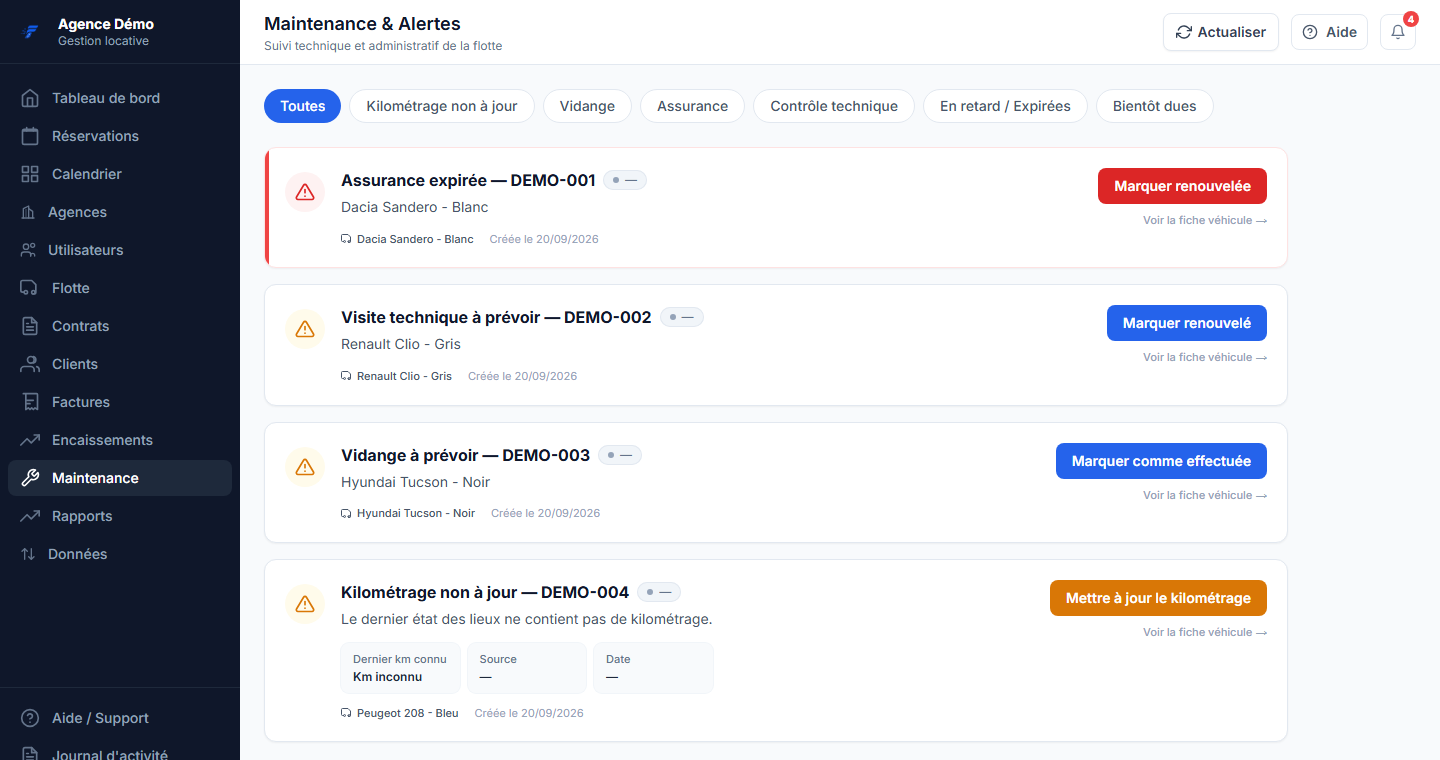
In a rental agency, administrative oversights do not only cost a fine: they cost a rental. The vehicle is booked, the customer is there, and the document expired the week before.
This guide explains how the product tracks those deadlines vehicle by vehicle. It summarises no regulation: the applicable renewal periods depend on the vehicle and on your situation, and are to be checked with your insurer and your inspection centre.
Four deadlines, two ways of tracking them
Some deadlines are computed from a start date and a period; others are carried by a dated document. The distinction matters, because it determines what you have to enter.
| Deadline | What you enter | How the deadline is obtained |
|---|---|---|
| Insurance | The start date and the renewal period, in months | The next deadline is computed from those two values |
| Technical inspection | The start date and the renewal period, in months | Same principle as insurance |
| Road tax sticker | A vehicle document of the road tax type, with its expiry date | The deadline is the expiry date of the document |
| Oil change | The interval in kilometres and the alert threshold, or a next service date | The deadline follows the mileage recorded on the vehicle |
The registration document and the service book are stored in the same place as the road tax sticker, as dated vehicle documents.
When the alerts fire
Alerts appear 30 days before the deadline. A deadline that has passed moves from a plain warning to an alert to be handled first, which avoids confusing what is merely upcoming with a vehicle driving on an expired document.
For the oil change, the trigger is based on mileage: the alert appears 500 kilometres before the deadline by default, and that threshold is set vehicle by vehicle. It must stay below the interval between two oil changes — a threshold larger than the interval would make no sense and is refused on input.
The alert board is not limited to the fleet: driving licences about to expire, overdue invoices and disputed contracts appear there too. It is a list of what will block a rental, not only a list of documents.
Mileage, the condition for the oil change alert
An oil change alert computed from a three-month-old mileage reading is useless. That is why the product separately flags vehicles whose mileage is not up to date, with the reason: no reliable reading, or a latest inspection with no mileage entered.
In practice the mileage keeps itself up to date if your agents record the odometer during pick-up and return inspections. It is a habit to build over the first two weeks; after that the fleet stays current on its own.
Bringing the fleet up to date in one session
The initial entry is the only real effort. Once done, it is not done again.
Steps 1Enter the insurance contracts
For each vehicle, enter the start date of the current contract and the renewal period in months.
Steps 2Enter the technical inspections
Same operation: date of the latest inspection and the period that applies to that vehicle.
Steps 3Attach the dated documents
Road tax sticker, registration document and service book are attached to the vehicle record with their expiry date when they have one.
Steps 4Set the oil change
Enter the interval in kilometres and the mileage of the last oil change, then the alert threshold if the default does not suit you.
What this guide does not promise
- No regulatory period is asserted here. The applicable durations depend on the vehicle and are to be checked with your insurer and your inspection centre.
- A deadline that is not entered produces no alert: the tracking is worth exactly what the initial entry is worth.
- The road tax sticker has no dedicated field on the vehicle record: it is tracked as a dated document.
- The oil change alert depends on an up-to-date mileage, therefore on readings taken during inspections.
Frequently asked questions
- How many days ahead am I warned?
- 30 days before the deadline for documents and dates. For the oil change the alert is mileage-based: 500 kilometres before the deadline by default, and that threshold is set vehicle by vehicle.
- How do I track the road tax sticker?
- As a vehicle document: you add a document of the road tax type with its expiry date, and the alert follows that date.
- What happens if the mileage is not recorded?
- The vehicle appears in the alerts as having a mileage that is not up to date, with the reason. The oil change alert itself cannot be computed reliably as long as no recent reading exists.
- Can I set a different alert threshold per vehicle?
- Yes for the oil change: each vehicle can have its own interval and threshold, as long as the threshold stays below the interval.
- Do the alerts only cover vehicles?
- No. The same list surfaces driving licences about to expire, overdue invoices and disputed contracts.