

Signing a rental contract, mode by mode
Signing at the counter, sending a link, adding a code received by email or uploading a contract signed by hand: LocaFlotte handles these four situations. Here is what each one actually produces, and what is kept.
The LocaFlotte team
The contract is the moment an agency commits its vehicle and its customer. It is rarely signed in ideal conditions: the customer is in a hurry, at the airport, picking up the car for someone else, or sending back a signed document the next day.
This guide describes the four signing modes available, the trace each one leaves and the durations that apply. It offers no legal opinion: the evidential value of a signature depends on your situation and is a matter for your own counsel.
The four modes, and when to use them
The mode is chosen contract by contract. Nothing forces you to settle on one for the whole agency.
| Mode | Typical situation | What is recorded |
|---|---|---|
| On the agency device | The customer is at the counter, in front of you | The handwritten stroke signed on screen, with the date and time |
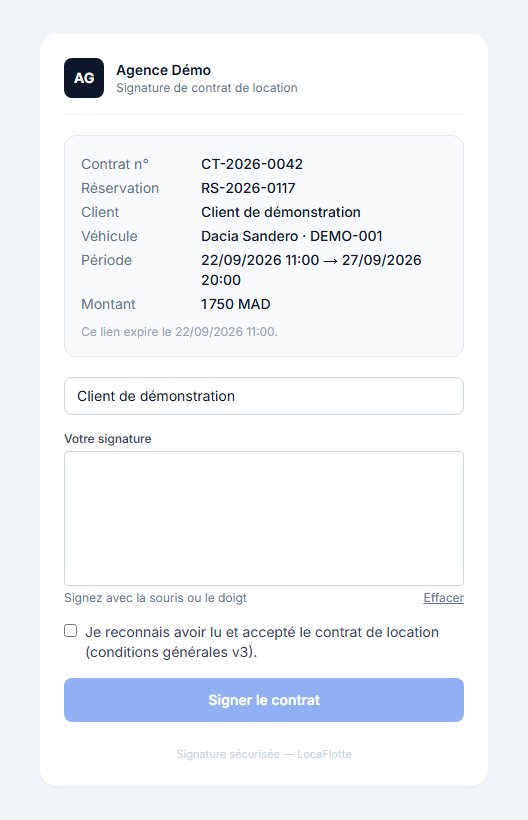
| Secure link | The customer is away: delivery, airport, second driver | The stroke signed from their device, the date, the IP address and the browser used |
| Secure link with an emailed code | You want an extra check before the contract opens | The same elements, after a code sent to the customer address has been entered |
| Upload of a signed contract | The customer signed on paper; you upload the document | The uploaded file, its name and its digital fingerprint |
What happens when you create a signing link
The moment the link is created, the contract content is frozen: its digital fingerprint and its version number are recorded. If the contract is changed afterwards, comparing it with that fingerprint shows it — which is exactly why it is frozen.
The link itself is never stored in clear text: only its fingerprint is kept. A link found in the database therefore does not allow anyone to sign in the customer's place.
Steps 1Creating the link
The contract is frozen, the link is generated and its expiry is computed. By default a link stays valid for 48 hours.
Steps 2Sending it to the customer
The link goes out to the customer. The sending date is recorded, then the date it was first opened.
Steps 3Code verification, if that mode is chosen
A code is sent to the customer address. It stays valid for 10 minutes and five attempts are allowed before it is blocked.
Steps 4Signature and archiving
The customer signs on the dedicated page. The signed contract is archived with its fingerprint, its size and its file type; the IP address and the browser used are kept.
Link validity and code validity are set for your agency: a link can last from one hour to thirty days. The defaults are 48 hours for the link and 10 minutes for the code.
The pick-up inspection is annexed to the contract
When a pick-up inspection is validated, it is not filed away in a corner: it becomes an annex to the contract PDF, with the damage recorded, the observations and the photos taken.
For the agency, that changes the conversation on return. The document handed to the customer already contains the condition recorded at pick-up, on the same date and under the same signature as the contract.
Following the state of a signature
A signature is not binary. Between preparation and a signed contract, the record goes through visible states: link created, sent, waiting for the code, code verified, signed. It can also expire, be cancelled or fail.
These states remove the most common question at the counter: has the customer signed? The answer is readable in the record, together with the date the link was last opened — useful to know whether the customer simply forgot to open the message.
What this guide does not promise
- This guide gives no legal qualification. It describes what the product records and archives; the value of a signature in your case is a matter for your legal counsel.
- Contracts and their annexes are generated in French.
- An expired link cannot be extended: you create a new one, which freezes the contract content again.
- The emailed code assumes a valid address for the customer. Without an address, use the plain link or signing at the counter.
Frequently asked questions
- How long does a signing link stay valid?
- 48 hours by default. The duration is set for your agency, from one hour to thirty days. After that the link no longer opens the contract and you create a new one.
- What happens if the customer mistypes the code?
- The code stays valid for 10 minutes and five attempts are allowed. Beyond that the check fails and a new code has to be sent.
- Can I change the contract after sending the link?
- The content was frozen when the link was created. If you change the contract, create a new link: the customer must sign the version actually in front of them.
- What if the customer prefers to sign on paper?
- That is the fourth mode: you print, they sign, you upload the signed document into the record. The file is archived with its digital fingerprint, like the others.
- Does the inspection appear in the signed document?
- Yes, when a pick-up inspection has been validated: it is annexed to the contract PDF with the damage, the observations and the photos.