


A small scratch or a difference in the fuel gauge can look unimportant when a rental car leaves the agency. At return, however, that detail can become a dispute: was the mark already there, was the tank handed over at the same level, and how many kilometres were actually driven? When the only record is a hurried paper sketch, the agency and the customer may have nothing more reliable than their memory.
A mobile vehicle inspection gives both sides a clearer reference. It records the condition of the car at departure and again at return, using the same practical points: mileage, fuel, cleanliness, existing or new damage, supporting photos and signatures. It does not replace a careful walk-around and it cannot prevent every disagreement. Its value comes from organizing evidence so that a later discussion starts with two dated records instead of two different recollections.
What is the departure inspection for?
The departure inspection fixes the reference condition at the moment the customer receives the keys. The agent reads the odometer, notes the fuel level and cleanliness, then checks the bodywork, windows, wheels and interior for existing marks. A scratch on a door, a chip in the windscreen or a dent in a bumper should be recorded before the vehicle leaves.
That reference protects both parties. The customer should not be charged for damage that was already present, while the agency needs a reliable record if something new appears. The best time to correct an incomplete description or add a missing photo is before the customer and agent sign, while both can still look at the vehicle together.
The return inspection: compare rather than guess
At return, the agent repeats the same checks instead of starting from a blank page. In LocaFlotte, damage recorded at departure can be carried into the return inspection as pre-existing. The agent can therefore separate an old mark from a change that needs attention and avoid assigning the customer responsibility for something documented before the rental.
The return record also captures the new odometer and fuel readings and the condition of cleanliness. The mileage updates the vehicle record, creating a useful history for mileage-based maintenance. These operational details matter even when there is no damage: they help the next agent prepare the car and close the rental with consistent information.
What a LocaFlotte inspection records
Mileage, fuel and cleanliness
The agent enters the odometer reading and fuel level at each stage. The application shows the last known mileage and can flag an inconsistent value, because an odometer should not move backwards. A cleanliness note completes the description when relevant. Using the same fields at departure and return makes the comparison easy to understand.
Damage, location and severity
Each mark can be described by type, severity, position on the vehicle and an optional comment. “Scratch on the car” is vague; “minor scratch on the right front door” gives the team something precise to check. Existing damage remains visible at return, which is essential when several small marks are close together.
Photos linked to the right area
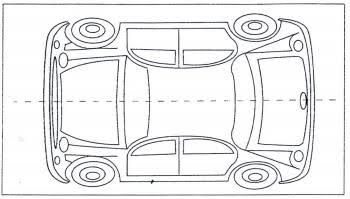
Photos can be attached by position: front, rear, left side, right side, interior or dashboard. They are optional, so the agent can adapt the level of detail to the situation. For a sensitive area, a wide photo can establish the location and a closer photo can show the mark. A clear image is more useful than a large number of rushed ones.
Customer and agent signatures
The customer and the agent can sign the inspection on screen. While the record is still a draft, the team can complete or correct it; once it is reviewed and validated, it becomes the reference attached to the rental contract. A signature does not repair missing information, so both people should review the readings, damage and useful photos first.
One record connected to the rental contract
The inspection is not an isolated form. It is connected to the rental contract created from the reservation. The signed departure inspection can be included as an appendix to the archived contract PDF, giving the agency one organized record for the rental conditions, the vehicle condition and the signatures. At return, the team can retrieve the contract and both inspections from the same rental file instead of searching through paper folders.
Also read:PDF rental contract softwareCreate a rental contract PDF from a booking
Carrying out the inspection in the field
Most inspections happen beside the car, at the agency car park, an airport or another pickup point. Depending on the modules enabled, the agent mobile application can be used there to record mileage, fuel, cleanliness, damage, photos and signatures. A consistent routine helps: read the odometer and fuel gauge, walk around the vehicle in the same order every time, check the interior, add the useful evidence, then review the completed record with the customer.
Also read:Mobile application for rental agentsPractical uses of the agency mobile app
Handling a difference found at return
If the agent finds a new dent, a lower fuel level or an unusual mileage difference, the departure record becomes the starting point for a factual conversation. The team can show the signed readings, the pre-existing damage and the corresponding photos, then identify exactly what changed. This is more constructive than asking either person to remember a hurried handover several days earlier.
The record supports the discussion; it does not make an automatic decision against the customer. The agency still has to apply its contract, internal process and applicable law. When evidence is incomplete, the honest approach is to note that limitation rather than claim more certainty than the inspection provides.
Fictional example: a disputed return
The following example is entirely fictional and is included only to explain the method. An agency rents an SUV for one week. At departure, the inspection shows 38,420 km, three quarters of a tank and a minor scratch on the left door, supported by a photo. Both people sign. At return, the odometer reads 39,060 km and the tank is half full. The agent also sees a chip on the rear bumper that is absent from the departure description and rear photo. The old door scratch remains classified as pre-existing, while the fuel difference and new bumper mark can be discussed separately with the customer. The comparison prevents three different subjects from becoming one confused argument.
Limits and agency responsibilities
A digital inspection reduces ambiguity; it does not guarantee that every dispute disappears. A dark photo, a vague damage description or a rushed walk-around can still leave room for disagreement. Agencies should train agents to follow a consistent order, involve the customer in the review and validate the record only when the important fields are complete. The legal effect of an inspection also depends on the contract and applicable rules, so a persistent formal dispute may require appropriate legal advice.
Frequently asked questions
What is the difference between departure and return inspections?
The departure inspection establishes the reference condition, including mileage, fuel, cleanliness and existing damage. The return inspection records the same points again and compares them with that reference, while carrying departure damage forward as pre-existing.
Are photos required for every inspection?
No. Photos are optional and can be attached by area of the vehicle. They are especially useful for existing damage, sensitive bodywork areas and readings that benefit from visual context.
Who signs the vehicle inspection?
The customer and the agent can both sign on screen after reviewing the information. The validated departure inspection can then be attached to the signed contract PDF.
Does the mileage reading update the vehicle file?
Yes. The recorded mileage updates the vehicle history and supports mileage-based maintenance tracking, such as planning an oil change from an actual odometer reading.
Can the inspection be completed on a phone?
Yes, depending on the modules enabled. The agent application supports the field workflow so the team can record the inspection beside the vehicle rather than return to a desk.
Does a digital inspection eliminate every dispute?
No. It provides a clearer reference, but its usefulness depends on a careful check, accurate entries, useful photos and a proper review with the customer.
In short, matching departure and return inspections turn a vague disagreement into a comparison of recorded facts. By keeping mileage, fuel, cleanliness, damage, photos and signatures together with the contract, an agency can protect the customer, its team and the value of its fleet without adding an unnecessarily complicated process.
Also read:Rental fleet managementHow to monitor a rental fleet every day
Organize departure and return inspections
See how LocaFlotte connects vehicle inspections, the rental contract PDF and day-to-day fleet records.
Request a demo